## Table of Contents
- [Features](#-features)
- [Installation](#-installation)
- [Requirements](#-requirements)
- [Motivation](#-motivation)
- [CLI](#-command-line-interface-cli)
- [Admin panel](#%EF%B8%8F-admin-panel-gui)
- [Usage / Workflow](#%EF%B8%8F-usage--workflow)
- [Config types](#-config-types)
- [Naming convention](#-naming-convention)
- [Settings](#-settings)
## ✨ Features
- **CLI** - `config-sync` CLI for syncing the config from the command line
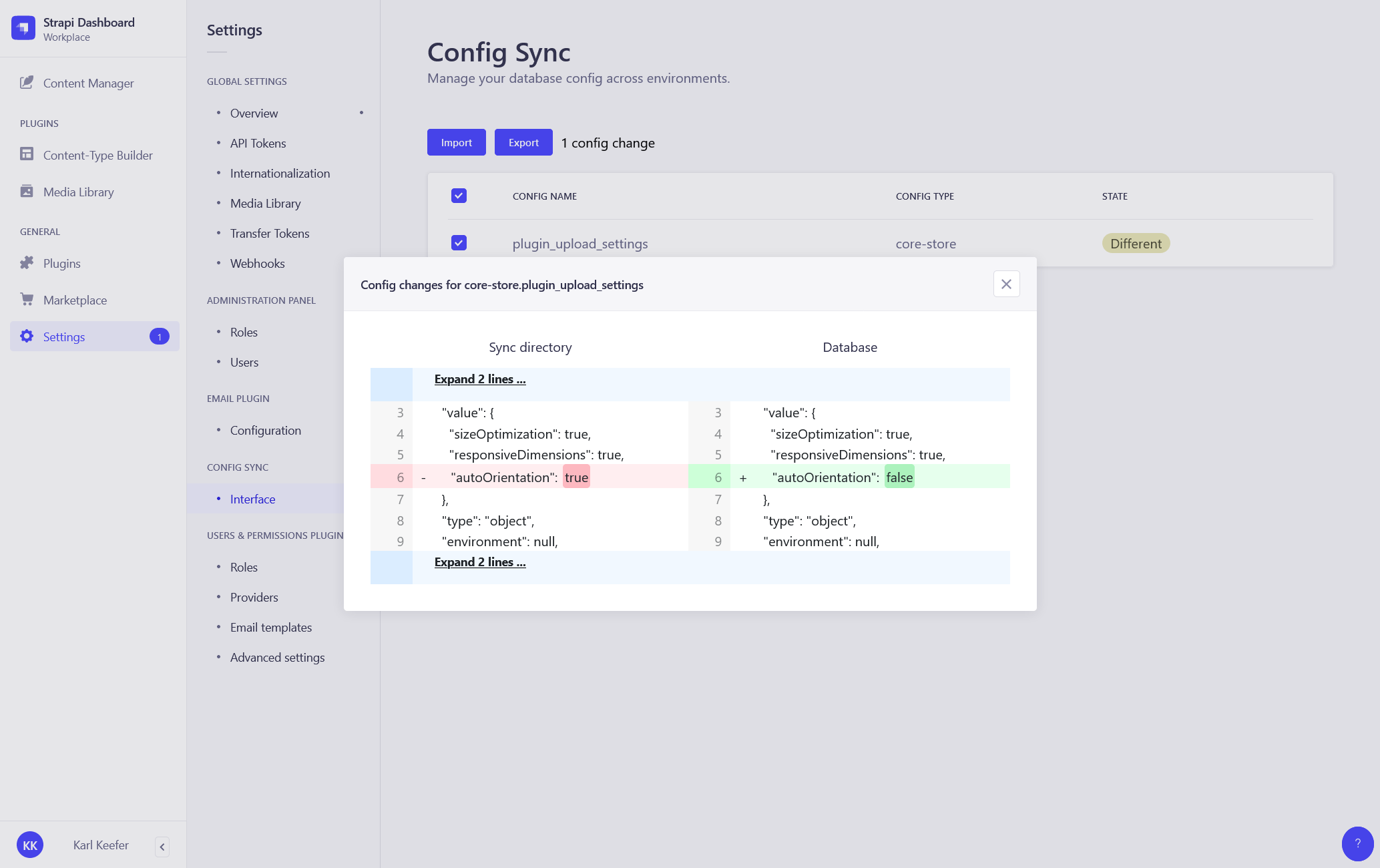
- **GUI** - Settings page for syncing the config in Strapi admin
- **Partial sync** - Import or export only specific portions of config
- **Custom types** - Include your custom collection types in the sync process
- **Import on bootstrap** - Easy automated deployment with `importOnBootstrap`
- **Exclusion** - Exclude single config entries or all entries of a given type
- **Diff viewer** - A git-style diff viewer to inspect the config changes
## ⏳ Installation
Install the plugin in your Strapi project.
```bash
# using yarn
yarn add strapi-plugin-config-sync
# using npm
npm install strapi-plugin-config-sync --save
```
Add the export path to the `watchIgnoreFiles` list in the `config/admin.js` file.
This way your app won't reload when you export the config in development.
##### `config/admin.js`:
```
module.exports = ({ env }) => ({
// ...
watchIgnoreFiles: [
'**/config/sync/**',
],
});
```
After successful installation you have to rebuild the admin UI so it'll include this plugin. To rebuild and restart Strapi run:
```bash
# using yarn
yarn build
yarn develop
# using npm
npm run build
npm run develop
```
The **Config Sync** plugin should now appear in the **Settings** section of your Strapi app.
To start tracking your config changes you have to make the first export. This will dump all your configuration data to the `/config/sync` directory. You can export either through [the CLI](#-command-line-interface-cli) or [Strapi admin panel](#%EF%B8%8F-admin-panel-gui)
Enjoy 🎉
## 🖐 Requirements
Complete installation requirements are the exact same as for Strapi itself and can be found in the [Strapi documentation](https://strapi.io/documentation).
**Supported Strapi versions**:
- Strapi 4.3.2 (recently tested)
- Strapi ^4.x (use `strapi-plugin-config-sync@^1.0.0`)
- Strapi ^3.4.x (use `strapi-plugin-config-sync@0.1.6`)
## 💡 Motivation
In Strapi we come across what I would call config types. These are models of which the records are stored in our database, just like content types. Though the big difference here is that your code ofter relies on the database records of these types.
Having said that, it makes sense that these records can be exported, added to git, and be migrated across environments. This way we can make sure we have all the data our code relies on, on each environment.
Examples of these types are:
- Admin roles _(admin::role)_
- User roles _(plugin::users-permissions.role)_
- Admin settings _(strapi::core-store)_
- I18n locale _(plugin::i18n.locale)_
This plugin gives you the tools to sync this data. You can export the data as JSON files on one env, and import them on every other env. By writing this data as JSON files you can easily track them in your version control system (git).
_With great power comes great responsibility - Spider-Man_
## 🔌 Command line interface (CLI)
Add the `config-sync` command as a script to the `package.json` of your Strapi project:
```
"scripts": {
// ...
"cs": "config-sync"
},
```
You can now run all the `config-sync` commands like this:
```bash
# using yarn
yarn cs --help
# using npm
npm run cs --help
```
### ⬆️ Import ⬇️ Export
> _Command:_ `import` _Alias:_ `i`
>
> _Command:_ `export` _Alias:_ `e`
These commands are used to sync the config in your Strapi project.
_Example:_
```bash
# using yarn
yarn cs import
yarn cs export
# using npm
npm run cs import
npm run cs export
```
##### Flag: `-y`, `--yes`
Use this flag to skip the confirm prompt and go straight to syncing the config.
```bash
[command] --yes
```
##### Flag: `-t`, `--type`
Use this flag to specify the type of config you want to sync.
```bash
[command] --type user-role
```
##### Flag: `-p`, `--partial`
Use this flag to sync a specific set of configs by giving the CLI a comma-separated string of config names.
```bash
[command] --partial user-role.public,i18n-locale.en
```
##### Flag: `-f`, `--force`
If you're using the soft setting to gracefully import config, you can use this flag to ignore the setting for the current command and forcefully import all changes anyway.
```bash
[command] --force
```
### ↔️ Diff
> _Command:_ `diff` | _Alias:_ `d`
This command is used to see the difference between the config as found in the sync directory, and the config as found in the database.
_Example:_
```bash
# using yarn
yarn cs diff
# using npm
npm run cs diff
```
##### Argument: `



 ## ⌨️ Usage / Workflow
This plugin works best when you use `git` for the version control of your Strapi project.
_The following workflows are assuming you're using `git`._
### Intro
All database records tracked with this plugin will be exported to JSON files. Once exported each change to the file or the record will be tracked. Meaning you can now do one of two things:
- Change the file(s), and run an import. You have now imported from filesystem -> database.
- Change the record(s), and run an export. You have now exported from database -> filesystem.
### Local development
When building a new feature locally for your Strapi project you'd use the following workflow:
- Build the feature.
- Export the config.
- Commit and push the files to git.
### Deployment
When deploying the newly created feature - to either a server, or a co-worker's machine - you'd use the following workflow:
- Pull the latest file changes to the environment.
- (Re)start your Strapi instance.
- Import the config.
### Production deployment
The production deployment will be the same as a regular deployment. You just have to be careful before running the import. Ideally making sure the are no open changes before you pull the new code to the environment.
## 🚀 Config types
By default the plugin will track 4 (official) types.
To track your own custom types you can register them by setting some plugin config.
### Default types
These 4 types are by default registered in the sync process.
#### Admin role
> Config name: `admin-role` | UID: `code` | Query string: `admin::role`
#### User role
> Config name: `user-role` | UID: `type` | Query string: `plugin::users-permissions.role`
#### Core store
> Config name: `core-store` | UID: `key` | Query string: `strapi::core-store`
#### I18n locale
> Config name: `i18n-locale` | UID: `code` | Query string: `plugin::i18n.locale`
### Custom types
Your custom types can be registered through the `customTypes` plugin config. This is a setting that can be set in the `config/plugins.js` file in your project.
_Read more about the `config/plugins.js` file [here](#-settings)._
You can register a type by giving the `customTypes` array an object which contains at least the following 3 properties:
```
customTypes: [{
configName: 'webhook',
queryString: 'webhook',
uid: 'name',
}],
```
_The example above will register the Strapi webhook type._
#### Config name
The name of the config type. This value will be used as the first part of the filename for all config of this type. It should be unique from the other types and is preferably written in kebab-case.
###### Key: `configName`
> `required:` YES | `type:` string
#### Query string
This is the query string of the type. Each type in Strapi has its own query string you can use to programatically preform CRUD actions on the entries of the type. Often for custom types in Strapi the format is something like `api::custom-api.custom-type`.
###### Key: `queryString`
> `required:` YES | `type:` string
#### UID
The UID represents a field on the registered type. The value of this field will act as a unique identifier to identify the entries across environments. Therefore it should be unique and preferably un-editable after initial creation.
Mind that you can not use an auto-incremental value like the `id` as auto-increment does not play nice when you try to match entries across different databases.
If you do not have a single unique value, you can also pass in a array of keys for a combined uid key. This is for example the case for all content types which use i18n features (An example config would be `uid: ['productId', 'locale']`).
###### Key: `uid`
> `required:` YES | `type:` string | string[]
#### JSON fields
This property can accept an array of field names from the type. It is meant to specify the JSON fields on the type so the plugin can better format the field values when calculating the config difference.
###### Key: `jsonFields`
> `required:` NO | `type:` array
## 🔍 Naming convention
All the config files written in the sync directory have the same naming convention. It goes as follows:
[config-type].[identifier].json
- `config-type` - Corresponds to the `configName` of the config type.
- `identifier` - Corresponds to the value of the `uid` field of the config type.
## 🔧 Settings
The settings of the plugin can be overridden in the `config/plugins.js` file.
In the example below you can see how, and also what the default settings are.
##### `config/plugins.js`:
module.exports = ({ env }) => ({
// ...
'config-sync': {
enabled: true,
config: {
syncDir: "config/sync/",
minify: false,
soft: false,
importOnBootstrap: false,
customTypes: [],
excludedTypes: [],
excludedConfig: [
"core-store.plugin_users-permissions_grant",
"core-store.plugin_upload_metrics",
"core-store.strapi_content_types_schema",
"core-store.ee_information",
],
},
},
});
### Sync dir
The path for reading and writing the sync files.
###### Key: `syncDir`
> `required:` YES | `type:` string | `default:` `config/sync/`
### Minify
When enabled all the exported JSON files will be minified.
###### Key: `minify`
> `required:` NO | `type:` bool | `default:` `false`
### Soft
When enabled the import action will be limited to only create new entries. Entries to be deleted, or updated will be skipped from the import process and will remain in it's original state.
###### Key: `soft`
> `required:` NO | `type:` bool | `default:` `false`
### Import on bootstrap
Allows you to let the config be imported automaticly when strapi is bootstrapping (on `strapi start`). This setting can't be used locally and should be handled very carefully as it can unintendedly overwrite the changes in your database. **PLEASE USE WITH CARE**.
###### Key: `importOnBootstrap`
> `required:` NO | `type:` bool | `default:` `false`
### Custom types
With this setting you can register your own custom config types. This is an array which expects objects with at least the `configName`, `queryString` and `uid` properties. Read more about registering custom types in the [Custom config types](#custom-types) documentation.
###### Key: `customTypes`
> `required:` NO | `type:` array | `default:` `[]`
### Excluded types
This setting will exclude all the config from a given type from the syncing process. The config types are specified by the `configName` of the type.
For example:
```
excludedTypes: ['admin-role']
```
###### Key: `excludedTypes`
> `required:` NO | `type:` array | `default:` `[]`
### Excluded config
Specify the names of configs you want to exclude from the syncing process. By default the API tokens for users-permissions, which are stored in core_store, are excluded. This setting expects the config names to comply with the naming convention.
###### Key: `excludedConfig`
> `required:` NO | `type:` array | `default:` `['core-store.plugin_users-permissions_grant', 'core-store.plugin_upload_metrics', 'core-store.strapi_content_types_schema', 'core-store.ee_information',]`
## 🤝 Contributing
Feel free to fork and make a pull request of this plugin. All the input is welcome!
## ⭐️ Show your support
Give a star if this project helped you.
## 🔗 Links
- [NPM package](https://www.npmjs.com/package/strapi-plugin-config-sync)
- [GitHub repository](https://github.com/boazpoolman/strapi-plugin-config-sync)
## 🌎 Community support
- For general help using Strapi, please refer to [the official Strapi documentation](https://strapi.io/documentation/).
- For support with this plugin you can DM me in the Strapi Discord [channel](https://discord.strapi.io/).
## 📝 Resources
- [MIT License](LICENSE.md)
## ⌨️ Usage / Workflow
This plugin works best when you use `git` for the version control of your Strapi project.
_The following workflows are assuming you're using `git`._
### Intro
All database records tracked with this plugin will be exported to JSON files. Once exported each change to the file or the record will be tracked. Meaning you can now do one of two things:
- Change the file(s), and run an import. You have now imported from filesystem -> database.
- Change the record(s), and run an export. You have now exported from database -> filesystem.
### Local development
When building a new feature locally for your Strapi project you'd use the following workflow:
- Build the feature.
- Export the config.
- Commit and push the files to git.
### Deployment
When deploying the newly created feature - to either a server, or a co-worker's machine - you'd use the following workflow:
- Pull the latest file changes to the environment.
- (Re)start your Strapi instance.
- Import the config.
### Production deployment
The production deployment will be the same as a regular deployment. You just have to be careful before running the import. Ideally making sure the are no open changes before you pull the new code to the environment.
## 🚀 Config types
By default the plugin will track 4 (official) types.
To track your own custom types you can register them by setting some plugin config.
### Default types
These 4 types are by default registered in the sync process.
#### Admin role
> Config name: `admin-role` | UID: `code` | Query string: `admin::role`
#### User role
> Config name: `user-role` | UID: `type` | Query string: `plugin::users-permissions.role`
#### Core store
> Config name: `core-store` | UID: `key` | Query string: `strapi::core-store`
#### I18n locale
> Config name: `i18n-locale` | UID: `code` | Query string: `plugin::i18n.locale`
### Custom types
Your custom types can be registered through the `customTypes` plugin config. This is a setting that can be set in the `config/plugins.js` file in your project.
_Read more about the `config/plugins.js` file [here](#-settings)._
You can register a type by giving the `customTypes` array an object which contains at least the following 3 properties:
```
customTypes: [{
configName: 'webhook',
queryString: 'webhook',
uid: 'name',
}],
```
_The example above will register the Strapi webhook type._
#### Config name
The name of the config type. This value will be used as the first part of the filename for all config of this type. It should be unique from the other types and is preferably written in kebab-case.
###### Key: `configName`
> `required:` YES | `type:` string
#### Query string
This is the query string of the type. Each type in Strapi has its own query string you can use to programatically preform CRUD actions on the entries of the type. Often for custom types in Strapi the format is something like `api::custom-api.custom-type`.
###### Key: `queryString`
> `required:` YES | `type:` string
#### UID
The UID represents a field on the registered type. The value of this field will act as a unique identifier to identify the entries across environments. Therefore it should be unique and preferably un-editable after initial creation.
Mind that you can not use an auto-incremental value like the `id` as auto-increment does not play nice when you try to match entries across different databases.
If you do not have a single unique value, you can also pass in a array of keys for a combined uid key. This is for example the case for all content types which use i18n features (An example config would be `uid: ['productId', 'locale']`).
###### Key: `uid`
> `required:` YES | `type:` string | string[]
#### JSON fields
This property can accept an array of field names from the type. It is meant to specify the JSON fields on the type so the plugin can better format the field values when calculating the config difference.
###### Key: `jsonFields`
> `required:` NO | `type:` array
## 🔍 Naming convention
All the config files written in the sync directory have the same naming convention. It goes as follows:
[config-type].[identifier].json
- `config-type` - Corresponds to the `configName` of the config type.
- `identifier` - Corresponds to the value of the `uid` field of the config type.
## 🔧 Settings
The settings of the plugin can be overridden in the `config/plugins.js` file.
In the example below you can see how, and also what the default settings are.
##### `config/plugins.js`:
module.exports = ({ env }) => ({
// ...
'config-sync': {
enabled: true,
config: {
syncDir: "config/sync/",
minify: false,
soft: false,
importOnBootstrap: false,
customTypes: [],
excludedTypes: [],
excludedConfig: [
"core-store.plugin_users-permissions_grant",
"core-store.plugin_upload_metrics",
"core-store.strapi_content_types_schema",
"core-store.ee_information",
],
},
},
});
### Sync dir
The path for reading and writing the sync files.
###### Key: `syncDir`
> `required:` YES | `type:` string | `default:` `config/sync/`
### Minify
When enabled all the exported JSON files will be minified.
###### Key: `minify`
> `required:` NO | `type:` bool | `default:` `false`
### Soft
When enabled the import action will be limited to only create new entries. Entries to be deleted, or updated will be skipped from the import process and will remain in it's original state.
###### Key: `soft`
> `required:` NO | `type:` bool | `default:` `false`
### Import on bootstrap
Allows you to let the config be imported automaticly when strapi is bootstrapping (on `strapi start`). This setting can't be used locally and should be handled very carefully as it can unintendedly overwrite the changes in your database. **PLEASE USE WITH CARE**.
###### Key: `importOnBootstrap`
> `required:` NO | `type:` bool | `default:` `false`
### Custom types
With this setting you can register your own custom config types. This is an array which expects objects with at least the `configName`, `queryString` and `uid` properties. Read more about registering custom types in the [Custom config types](#custom-types) documentation.
###### Key: `customTypes`
> `required:` NO | `type:` array | `default:` `[]`
### Excluded types
This setting will exclude all the config from a given type from the syncing process. The config types are specified by the `configName` of the type.
For example:
```
excludedTypes: ['admin-role']
```
###### Key: `excludedTypes`
> `required:` NO | `type:` array | `default:` `[]`
### Excluded config
Specify the names of configs you want to exclude from the syncing process. By default the API tokens for users-permissions, which are stored in core_store, are excluded. This setting expects the config names to comply with the naming convention.
###### Key: `excludedConfig`
> `required:` NO | `type:` array | `default:` `['core-store.plugin_users-permissions_grant', 'core-store.plugin_upload_metrics', 'core-store.strapi_content_types_schema', 'core-store.ee_information',]`
## 🤝 Contributing
Feel free to fork and make a pull request of this plugin. All the input is welcome!
## ⭐️ Show your support
Give a star if this project helped you.
## 🔗 Links
- [NPM package](https://www.npmjs.com/package/strapi-plugin-config-sync)
- [GitHub repository](https://github.com/boazpoolman/strapi-plugin-config-sync)
## 🌎 Community support
- For general help using Strapi, please refer to [the official Strapi documentation](https://strapi.io/documentation/).
- For support with this plugin you can DM me in the Strapi Discord [channel](https://discord.strapi.io/).
## 📝 Resources
- [MIT License](LICENSE.md)